
Adding Google Alerts To Press Recaps
Fetcher Press Recaps give you the ability to monitor google alerts from within the Fetcher platform. Google Alerts are refreshed every 12 hours by Fetcher.com, and you can exports your Google Alerts to Excel Spreadsheets for clients.
To add a new google alert to the fetcher platform, you need to first add the alert to Google. Login to your Google account (any account will work, it does not have to be the one connected to GetFetcher.com) and go to the Alerts Page.
You can add your Google alert by adding the alert name to the input field. In the following example, I am going to add “The Guggenheim” as a new Google Alert
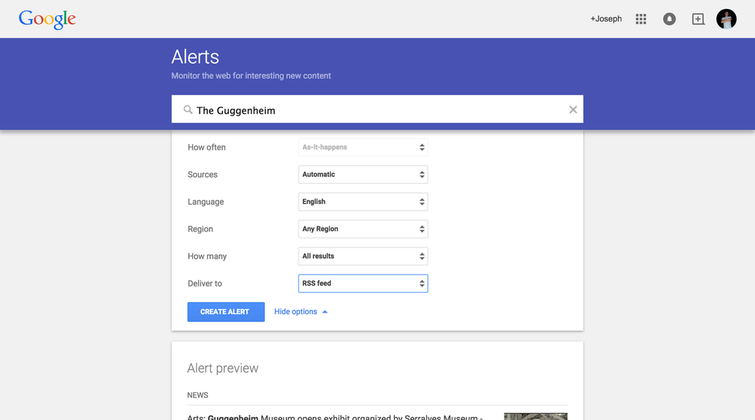
Before adding the alert, select the Show Options dropdown and select
- How Often –> As It Happens
- How Many –> All Results
- Deliver To –> RSS Feed
Now create the alert.
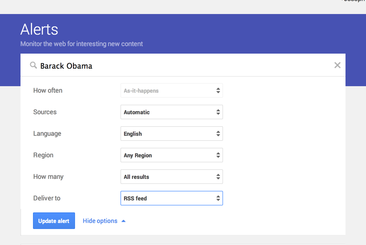
Once the alert has been created, select the RSS icon on the alert and you will can get the RSS feed url, which is what you need to provide to the Fetcher platform. An example of what the RSS feed URL looks like can be found here
Finally, your alert name and RSS feed url to GetFetcher.com
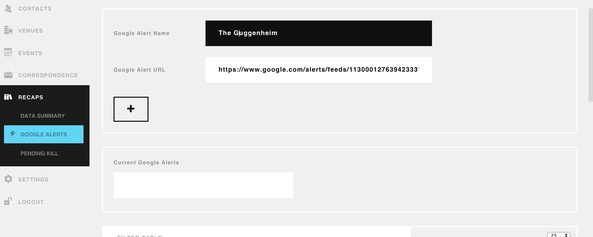
Once the alert has been added, wait about 5-10 seconds for Fetcher to pull your RSS feed data and refresh your page:
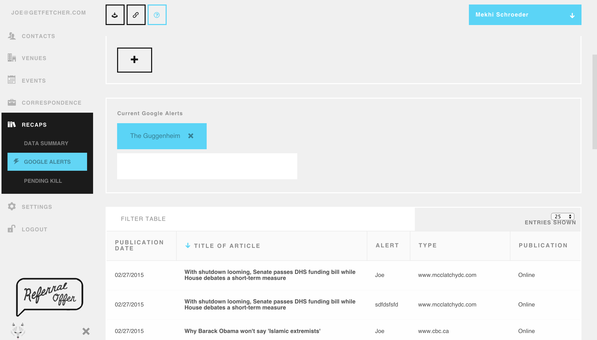
That is it! You can now export, sort, and search your google alerts.